Best AI SEO Tools for SaaS Founders (2026): 9 Options Compared
An honest comparison of AI SEO tools for SaaS founders and solo builders: Ahrefs, Semrush, Surfer, Clearscope, Frase, Outrank, SEObot, Arvow, and NichePressa. Prices, free options, publishing, and Search Console.

You have a product, a blog with four posts, and no time.
Every "best AI SEO tools" list you find is written for agencies with ten writers. It compares forty tools, recommends all of them, and never asks the question that matters most for a founder: where does your blog actually live?
That question removes half the options before features or price come into it. A tool that auto-publishes to WordPress does nothing for a Next.js blog in a GitHub repo, and the other way round.
So this list is short, grouped by the job each tool does, and honest about what we could and could not confirm.
Quick picks
| If you... | Look at |
|---|---|
| Need keyword and competitor research first | Ahrefs, Semrush |
| Write posts yourself and want help optimizing them | Surfer, Clearscope |
| Want articles written and published to WordPress, Webflow, Shopify or similar | Frase, Outrank, SEObot, Arvow |
| Have a Next.js or Astro blog that lives in a Git repo | NichePressa (ours), or Outrank or SEObot through their Next.js setup |
| Can't spend money yet | Search Console plus a chat model (see the end of this post) |
The comparison table
| Tool | Cheapest paid plan | Free option | Publishes to your site | Uses Search Console | Autopilot |
|---|---|---|---|---|---|
| Ahrefs | Starter $29/mo (research). AI Content Helper is an add-on from $99/mo | Ahrefs Free, 1 AI Content Helper doc a month | No. Google Docs export | Yes, in the platform | No |
| Semrush Content Toolkit | $60/mo | Free account, 7-day trial | WordPress (plugin), Google Docs | Not mentioned for the content tools | No |
| Surfer | Discovery $59/mo ($49/mo yearly), editor and 120 documents | No free plan. Trial terms not stated | WordPress (Standard plan and up), Contentful, Google Docs. Markdown download | Yes, for audit features | No |
| Clearscope | Essentials $129/mo | 14-day trial | No direct publishing confirmed. Google Docs, Word, WordPress plugin for grading | Yes | No |
| Frase | Starter $49/mo ($39/mo yearly), 10 articles | 7-day trial, no card | WordPress, Webflow, Sanity, Wix, FraseCMS, API | Yes | Opt-in per content type |
| Outrank | $99/mo, 30 articles | Free trial, length not stated (watermarked articles) | WordPress, Webflow, Shopify, Framer, Wix, Ghost, Notion, webhook, Next.js via npm package | Yes, for article improvements | Yes |
| SEObot | From $49/mo, 9 articles | No trial mentioned. Refund on the $49 plan | WordPress, Webflow, Shopify, Framer, Ghost, HubSpot, Wix and more, Next.js via npm package, API | Mentioned, not documented | Yes (toggle) |
| Arvow | Solo $69/mo ($39/mo yearly), 1 website, credit-based | None mentioned | WordPress, Shopify, Wix, Ghost, Webflow, Framer, Squarespace and more, webhook with Markdown | Through its AI-assistant connector | Yes |
| NichePressa (ours) | Starter $39/mo, 10 articles | 2 articles free, no card | Commits MDX to your GitHub repo, on main or a review branch | Yes, plus GA4 | Scheduled autopilot or manual review |
Research suites: find what to write
These are the big SEO platforms. Their core job is keyword research, competitor research, and rank tracking. AI writing sits on top as an add-on.
Ahrefs
Researched, not tested.
Ahrefs is the research tool many SEO people already use. Its AI content feature, AI Content Helper, is an editor that checks search intent, grades your draft against the pages that rank, and points out missing subtopics. It can build a brand kit from your existing articles to keep the tone consistent.
The cheapest Ahrefs plan, Starter, is $29/mo and covers keyword and competitor research. The AI content tools are a separate Content Kit add-on, listed "from $99/mo" on the pricing page. The AI Content Helper product page showed euro prices to us, so check the price in your region. There is no free trial, but Ahrefs Free includes one AI Content Helper document a month.
It does not publish to your site. You export to Google Docs.
Good fit if research is your bottleneck and you write the posts yourself.
Semrush Content Toolkit
Researched, not tested.
Semrush's content product is now called Content Toolkit (it used to be ContentShake AI). It generates articles in a saved brand voice, optimizes drafts for Google and AI search, writes SEO briefs, finds topics, and turns pages into social posts and newsletters.
It costs $60/mo on monthly or yearly billing, with a free account and a 7-day trial. That is separate from Semrush's SEO plans, which start at $139/mo.
It publishes to WordPress through a plugin, as a live post or a draft, and sends drafts to Google Docs. We did not find Search Console mentioned for the content tools.
Good fit if you are on WordPress and want research, writing, and social repurposing from one vendor.
Content optimizers: help you write better
These assume a person writes, or at least edits, every post. They score the draft against what ranks and suggest what to add.
Surfer
Researched, not tested.
Surfer (now at surfer.ai) calls itself an AI search visibility platform: a content editor with a content score, an AI writing assistant, AI visibility tracking, and a content audit. Its audit and internal-linking features use Search Console data once you connect it.
The cheapest plan, Discovery, is $59/mo monthly or $49/mo billed yearly. It covers the editor and its optimization guidelines, the Surfy writing assistant, and 120 documents. AI visibility tracking, one-click optimization, and integrations start on Standard ($119/mo, or $99/mo yearly), and some features sit on higher plans still, so check the plan table for the feature you want. There is no free plan. The site has "Start for free" buttons, but we could not find trial terms.
Publishing to WordPress needs the Standard plan or higher. You can also download a draft as a Markdown (.md) file, which is the closest any of the optimizers get to a Git-based workflow.
Good fit if you write your own posts and want a clear score to aim for.
Clearscope
Researched, not tested.
Clearscope finds the questions buyers ask, writes AI drafts that follow your brand guidelines, grades content from A++ to F, and tracks which terms AI assistants use. Its Monitor feature shows each page's Search Console clicks, impressions, and position after it goes live.
It is the most expensive option here: Essentials is $129/mo, with a 14-day free trial.
We did not find direct publishing. It works inside Google Docs, Microsoft Word, and a WordPress plugin that grades a post before it goes live.
Good fit if you have a writer or a small team and care most about quality per post.
Autopilot tools: write and publish for you
These do the whole loop: pick keywords, write, and publish on a schedule. The difference between them is mostly where they can publish and how much review you keep.
Frase
Researched, not tested.
Frase describes itself as a content system for AI search. Its agent researches, drafts, optimizes, and publishes, and its Content Guard feature watches your Search Console positions and clicks.
Starter is $49/mo monthly ($39/mo yearly) with 10 articles a month, and every plan has a 7-day free trial with no card.
The autopilot is careful by default: every content type starts in review, so you approve each draft until you switch that type to auto-publish. It publishes to WordPress, Webflow, Sanity, Wix, its own hosted CMS, and anything you connect through its API and webhooks.
Good fit if you want autopilot but prefer to approve drafts at first.
Outrank
Researched, not tested.
Outrank researches keywords, writes articles, publishes them automatically, and also sells backlinks. With Search Console connected, its Article Improvements feature re-optimizes published articles on a schedule you set.
The plan is $99/mo for 30 articles a month, roughly one a day. There is a free trial whose articles carry a watermark. We could not find its length on the pricing page.
It publishes to WordPress, Webflow, Shopify, Framer, Wix, Ghost, Notion, and a webhook or API. For Next.js, your site pulls articles through Outrank's API with an npm package, and there is a starter repo on GitHub. Articles live in Outrank and your site fetches them. They are not committed to your repo.
Good fit if you want volume, a daily cadence, and you are fine with articles living in the vendor's system.
SEObot
Researched, not tested.
SEObot is an AI SEO agent: you enter your URL, and it plans keywords, writes articles every week, adds internal links, and builds backlinks.
Plans start at $49/mo. Its help center lists 9 articles a month on that plan and says more plans appear after onboarding. We found no free trial, but the $49 plan has a full refund if you are unhappy after the first article.
It publishes to a long list of CMSs, including WordPress, Webflow, Shopify, Framer, Ghost, HubSpot, Notion, and Wix, plus a REST API and webhooks. Like Outrank, Next.js works through an npm package that pulls articles from SEObot, with an example repo on GitHub. Auto-publish is a toggle: off means articles arrive as drafts.
Good fit if you want a low entry price and a hands-off weekly cadence.
Arvow
Researched, not tested.
Arvow finds content opportunities, writes and auto-publishes through AutoBlog, builds backlinks, and tracks AI search visibility. It also offers a connector so your own AI assistant can work with your Arvow data, including Search Console.
Solo is $69/mo monthly or $39/mo billed yearly (a 50%-off yearly sale was running when we checked). It covers one website, AutoBlog, and the integrations. Automatic backlinks, AI brand visibility tracking, and up to five websites start on Business ($169/mo, or $69/mo yearly). Plans are credit-based rather than article-based. We found no free plan or trial on the pricing page.
It publishes to WordPress, Shopify, Wix, Ghost, Webflow, Framer, Blogger, Squarespace, and more. Its webhook sends each article as both HTML and Markdown, so a custom site can receive it.
Good fit if you want auto-publishing to a hosted CMS. If you run several sites or want the backlinks, budget for Business, not Solo.
For blogs that live in a Git repo
NichePressa
Ours.
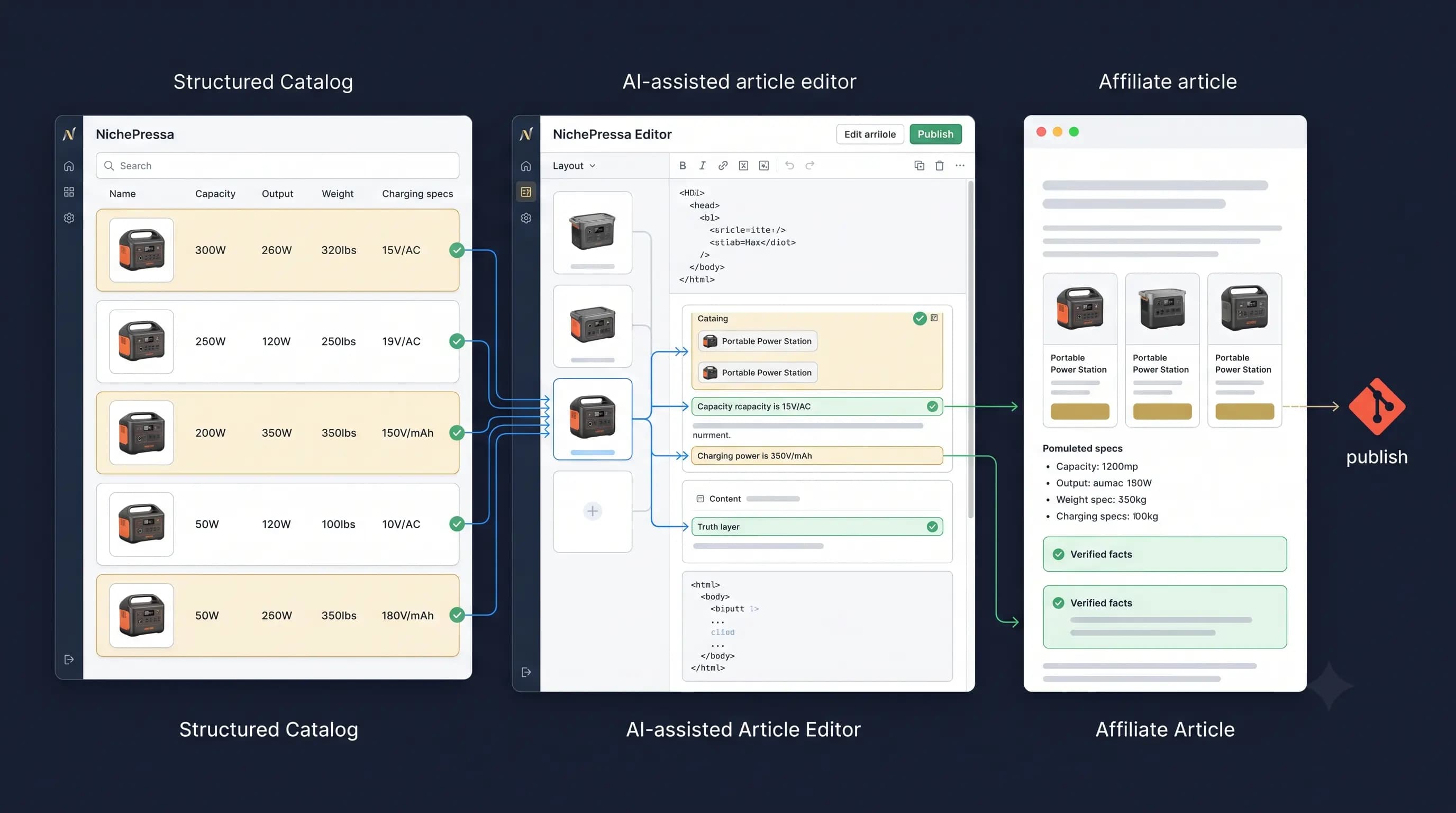
NichePressa is built for the case the other eight mostly skip: a founder's blog written in MDX, in a GitHub repo, deployed with Next.js or Astro.
- It commits each article to your repo, on main or on a review branch you merge yourself.
- It learns your voice from your own posts and uses it in every article.
- A weekly review reads your Search Console and GA4 data to decide what to write next and which slipping pages to update.
- It runs on scheduled autopilot or manual review, your choice.
- Product facts in comparisons and reviews come from your own catalog, not the model's memory. Prices, specs, and plan details are filled in from your structured product data when the article publishes, so the model does not have to guess them.
Starter is $39/mo for 10 articles a month. You can try it with 2 articles free, no card, starting from just your site's URL.
Not a fit if your blog is on WordPress, Webflow, Wix, or Shopify. NichePressa does not publish there, and the tools above do. Its automatic setup also expects MDX.
How to choose, as a SaaS founder
1. Start with where your blog lives.
On WordPress, Webflow, Shopify, Wix, or Ghost, every autopilot tool above can publish for you. Compare them on review controls and price per article.
In a Git repo, you have three patterns, and the difference matters more than any feature list:
| Commit to the repo | Pull from an API | Export and paste | |
|---|---|---|---|
| Who | NichePressa | Outrank, SEObot (Next.js packages) | Surfer's Markdown download, or any writer |
| Where posts live | MDX files in your repo, next to your code | On the vendor's service; your site fetches them | Your repo, once you commit them |
| What your site depends on | Nothing extra at build or run time | The vendor's package and API | Nothing extra |
| How you review | A normal diff, or a review branch you merge | In the vendor's dashboard | However you edit before committing |
| If you stop paying | The files stay in your repo | Check the vendor's terms for what happens to hosted articles | The files stay in your repo |
| Effort per post | Low | Low | High: you move every post by hand |
If your posts are part of your product's site, ask one question before you pick: do you want your content in Git, or behind someone else's API?
2. Decide how much you want to review.
Autopilot is only useful if you trust what goes live. Frase starts in review. SEObot's auto-publish is a toggle. NichePressa can commit to a review branch. Whatever you pick, read the first few posts closely before you let anything publish on its own.
3. Check whether the tool uses your Search Console data.
A tool that reads your own clicks and impressions can tell you which posts are slipping and what to write next. One that only reads competitors' pages cannot. In the table, look at the "Uses Search Console" column.
4. Price it per useful article, not per month.
Compare the number of articles you would actually publish in a month, not the plan's maximum. A cheaper plan that covers your real pace beats a bigger one you never use up.
The free option
If you can't spend money yet, you can get surprisingly far with free tools:
- Google Search Console shows what you already rank for and which pages are slipping. Our guide to finding and fixing content decay walks through it.
- A chat model (ChatGPT, Claude, Gemini) can turn your notes into a draft, if you give it your real product facts and an example of your writing. Our guide on building an editorial voice shows how.
- An hour a week to pick one topic from your Search Console queries, write, and publish.
What you give up is the planning, the consistency, and the follow-up. That is the work the paid tools take over.
Frequently asked questions
What is the best AI SEO tool for a SaaS startup?
It depends on where your blog lives and what you are short on. For research, look at Ahrefs or Semrush. To improve posts you write yourself, Surfer or Clearscope. For written-and-published articles on WordPress or Webflow, Frase, Outrank, SEObot, or Arvow. For a blog in a Git repo, NichePressa, which we make.
Are AI SEO tools worth it for early-stage startups?
They can be, if your bottleneck is publishing consistently. If you have very little traffic, start with the free option (Search Console plus a chat model) and pay for a tool once you know which topics bring in sign-ups.
Can AI SEO tools publish to a Next.js blog?
Some can. Outrank and SEObot provide npm packages that let a Next.js site pull articles from their service. NichePressa commits MDX files directly to your GitHub repo. Surfer lets you download Markdown to commit yourself.
What is the best AI SEO tool for an Astro or Next.js blog?
If your posts are Markdown or MDX files in a Git repo, look for a tool that commits files to the repo rather than one that only publishes to WordPress-style CMSs. NichePressa (ours) does this for MDX and plans from your Search Console data. Outrank and SEObot support Next.js by having your site fetch articles from their API. For Astro, none of the other eight tools we looked at named an Astro integration, so export-and-commit is the fallback.
Do I need Ahrefs or Semrush if I use an AI writer?
Not always. Many AI writers do their own keyword research. A research suite is most useful when you want to study competitors or check keyword data yourself before deciding what to publish.
Is AI-written content bad for SEO?
Google's published guidance says it rewards helpful content however it is produced, and treats content made mainly to manipulate rankings as spam. What matters is whether the post is accurate and useful, so review AI drafts before they go live.
NichePressa writes in your voice and commits to your repo. Create two articles free.