SaaS Plan Comparisons: Write Conditional Features Clearly
Write SaaS plan comparisons that preserve add-on, region, and usage conditions. Use a hypothetical entitlement matrix to separate unknown from unavailable.
 Roy Levy
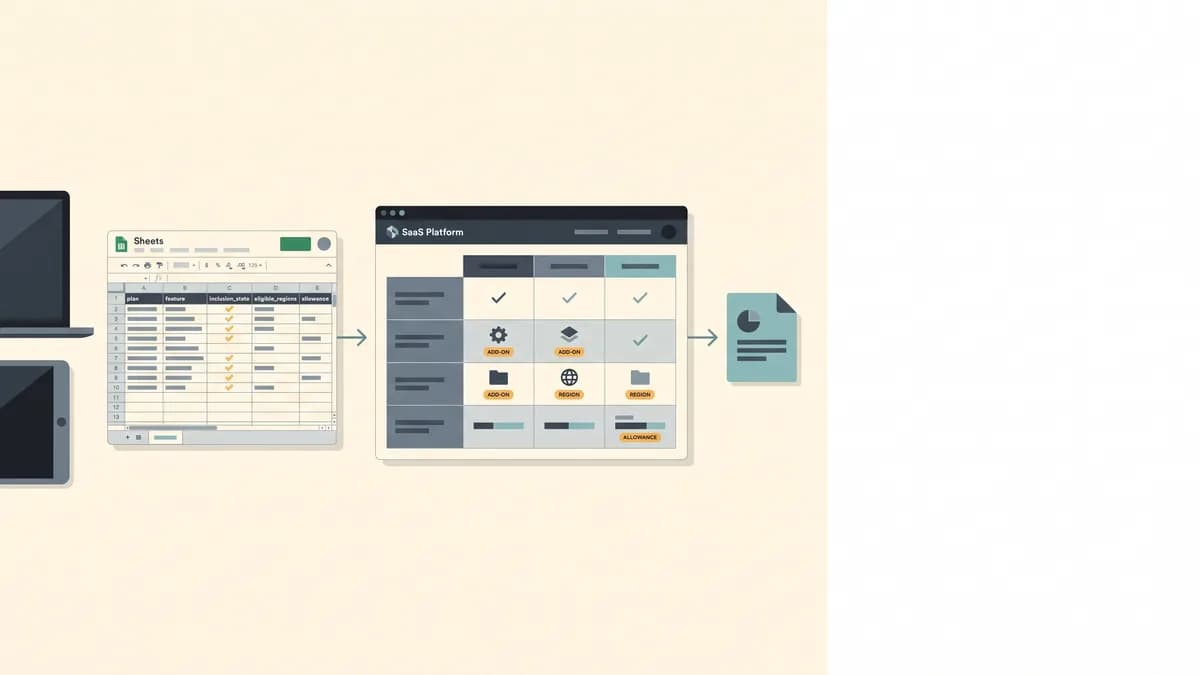
A checkmark can be false even when the feature exists. In a SaaS plan comparison, the claim that matters is whether this reader qualifies. That depends on plan, add-on, hosting region, and usage. Every condition belongs beside the claim it qualifies: in the source record, in the table cell, and in the sentence that follows the table.
The real failure is not an ugly table. It is a buyer who picks a plan because a qualifier disappeared somewhere between the pricing page and your draft. You publish the recommendation, so you own that outcome.
A checkmark is not a SaaS plan comparison claim
Suppose your plan sheet says a feature exists, but only with an add-on and only in certain hosting regions. Your draft reduces that to a checkmark. Meanwhile, a feature the vendor never documented on the cheaper plan has turned into a cross. Both cells are wrong, in opposite directions.
Conditional feature availability involves five separate claims:
- Existence: the vendor offers the feature somewhere.
- Base-plan inclusion: the plan includes it with no further purchase.
- Optional purchase: the plan can get it, but only by buying an add-on.
- Regional eligibility: the workspace's hosting region qualifies.
- Allowance sufficiency: the included quantity covers the reader's usage.
A checkmark collapses all five into one yes. Treat each comparison claim instead as a scoped eligibility statement: who gets this, under which conditions, and in what quantity.
Keep an editorial entitlement worksheet
Before you write a single cell, put each plan-feature pair on its own row in a worksheet. The fields below are a proposed editorial template, not a NichePressa input schema. Their job is to force every condition into a named slot, so nothing rides along as an implied footnote.
| Field | Holds | Feeds |
|---|---|---|
| plan | Plan name | Claim subject |
| feature | Feature name | Claim subject |
| inclusion_state | included / add-on / unavailable / undocumented | Eligibility wording |
| required_add_on | Add-on name, none, or unknown | Eligibility wording |
| eligible_workspace_regions | Region list, all, or unknown | Eligibility wording |
| included_allowance | Number, n/a, or unknown | Quantity wording |
| allowance_unit | e.g. requests | Quantity wording |
| allowance_period | e.g. calendar month | Quantity wording |
| exhaustion_behavior | Documented policy or unknown | Quantity wording |
| source_ref | Where the record came from | Traceability |
| checked_at | Date the source was checked | Traceability |
The last column is the point. Plan and feature tell you what the sentence is about. Inclusion state and prerequisites decide the eligibility wording. The allowance fields decide the numbers. Source reference and check date make the claim traceable when a vendor changes its pricing page next quarter.
Explicit unknown and not-applicable values
Two values do most of the protective work, and they mean different things:
- n/a means the field does not apply. SSO has no request allowance, so its allowance fields are n/a.
- unknown means the field applies, but the source does not say. API access has an exhaustion behavior. If the source is silent on it, that field is unknown.
A blank cell is neither. Sooner or later a writer, a template, or a model will read it as "no." Fill every field.
Sometimes the worksheet exposes a deeper problem: two sources disagree, or a column is mislabeled. Repair that before you interpret anything. The product catalog import checklist that separates missing data from factual conflicts covers the repair.
A populated example row, using fictional provenance for a hypothetical dataset:
- plan: Example Team
- feature: API access
- inclusion_state: included
- required_add_on: none
- eligible_workspace_regions: all (US, EU)
- included_allowance: 100,000
- allowance_unit: requests
- allowance_period: calendar month, per workspace
- exhaustion_behavior: unknown
- source_ref: Example Team plan page, API section (fictional)
- checked_at: 2026-11-01 (fictional)
Build the SaaS entitlement matrix with conditions in the cells
The plans below are hypothetical: Example Starter and Example Team. Region means workspace hosting region, where the customer's workspace data is hosted, not where the buyer sits. This example covers two hosting regions, US and EU.
Every condition stays inside the cell it qualifies. If a reader has to scroll to a footnote to learn that SSO needs an add-on, the table has already misled them.
| Feature | Example Starter | Example Team |
|---|---|---|
| SSO | Unavailable | Available only to US-hosted workspaces that have purchased the Security add-on; both conditions required |
| Regional archiving | Unavailable | Included only for EU-hosted workspaces |
| API access | 10,000 requests included per workspace per calendar month; treatment above the allowance is undocumented | 100,000 requests included per workspace per calendar month; treatment above the allowance is undocumented |
| Audit log export | Undocumented: availability unknown, not confirmed unavailable | Included for US-hosted and EU-hosted workspaces |
This table looks heavier than a grid of checkmarks. That is the correct trade. A SaaS feature comparison table exists to help someone choose, and every phrase in these cells changes who should choose what.
Turn each record into a qualified comparison sentence
Tables get skimmed, excerpted, and quoted out of context, so each feature needs a standalone sentence carrying the same conditions as its cell:
- SSO: Example Starter does not offer SSO. Example Team offers SSO only to US-hosted workspaces that have also purchased the Security add-on.
- Regional archiving: Example Starter does not offer regional archiving. Example Team includes it only for EU-hosted workspaces.
- API access: Example Starter includes 10,000 API requests per workspace per calendar month, and Example Team includes 100,000. Neither plan's documentation states what happens above its allowance.
- Audit log export: Example Team includes audit log export for both US-hosted and EU-hosted workspaces. Example Starter's documentation does not say whether audit log export is available.
Notice what the API sentence refuses to do. It does not say "100,000 requests" without the unit, scope, and period. It does not say "generous limits," which implies the reader will not hit them. And it does not guess at overage pricing, throttling, or blocking. Undocumented exhaustion behavior stays labeled unknown.
Cumulative conditions: add-on AND region
The SSO record has two prerequisites, and both must hold. Buying the Security add-on does not satisfy the US-hosting condition. Being US-hosted does not satisfy the add-on condition.
Two writing habits break this. The first is collapsing to one condition: "SSO available with the Security add-on." That sentence is accurate for US-hosted workspaces and false for EU-hosted ones. The second is splitting the conditions across paragraphs, so the region restriction shows up three sections after the reader has decided.
Write the AND explicitly, in the same sentence as the availability claim, every time availability is asserted. If you mention SSO on Example Team in a summary, an FAQ, or a pull quote, both conditions travel with it. No add-on claim appears without the region condition it depends on.
Unavailable versus undocumented
Example Starter's SSO and Example Starter's audit log export may look alike in a lazy table. They are not alike.
SSO on Example Starter is documented as unavailable. You can write "does not offer" and reject the plan for any reader who needs SSO.
Audit log export on Example Starter is undocumented. You have no basis for "does not offer." A cross there invents a negative fact. It may cost the vendor a sale, and it costs your page credibility when a reader finds the feature. The honest wording names the gap: the documentation does not say. A reader who needs audit log export now knows to ask before buying.
An absent entitlement is a fact. Absent documentation is a boundary on what you know. Your comparison should show which one it is.
Worked example: an EU-hosted Example Team workspace that needs SSO
Here is how one reader's situation resolves against the matrix. The reader's inputs are example values chosen for illustration: an EU-hosted Example Team workspace, Security add-on already purchased, SSO required, and expected demand of 120,000 API requests per workspace per calendar month.
- Establish the workspace inputs: Example Team plan, EU-hosted workspace, Security add-on purchased, SSO required, 120,000 API requests expected per workspace per calendar month.
- Evaluate both SSO prerequisites: the Security add-on condition passes; the US-hosting condition fails because the workspace is EU-hosted. Both are required, so SSO is not available to this workspace.
- Calculate the API allowance gap: 120,000 requests demanded minus 100,000 requests included equals 20,000 requests per calendar month above the included allowance.
- State the verdict: this configuration fails the stated SSO requirement, and the records do not establish support for the remaining 20,000 requests because above-allowance treatment is undocumented.
The checkmark version of this table would have said "Example Team: SSO ✓, API ✓" and pointed the reader toward a yes. The conditional version produces a specific negative fit verdict instead.
The same records tell you something else useful. This EU-hosted workspace does qualify for regional archiving on Example Team. The region that fails SSO passes archiving, because conditions attach to features, not to plans.
The verdict has limits worth stating. The records do not say whether a workspace can change its hosting region, so you cannot recommend "switch to US hosting" as a fix. Even if it were possible, it would cost this reader regional archiving. And the 20,000-request gap does not mean the extra requests are blocked, billed, or throttled. It means the documentation does not say which.
Deciding what to put in front of the reader is a separate judgment from deciding what is true. The SSO failure leads the verdict because SSO is the stated requirement; regional archiving is a secondary note. On choosing which facts lead a recommendation, see why a product catalog knows what is true but not what matters.
Ground the facts, then approve the interpretation
Catalog-Grounded Generation is the layer that keeps the facts honest. NichePressa reads from a structured catalog, such as CSV, JSON, or database records, and passes only the relevant fields into the generation context. The article can only describe facts that exist in that source data. If a detail is not in the catalog, it does not get written. That stops the most common AI failures in comparisons: invented specs, features that do not exist, and filler written to hit a word count.
It also has a clear limit. It requires upfront work to structure the catalog, and it grounds facts; it does not interpret entitlements. Omission prevents invention, but in a comparison an omitted cell can still read as a "no." So whenever the reader's decision depends on a missing fact, the editor puts undocumented into the record as an explicit value, and the absence gets stated instead of silently dropped.
Everything in the worked example is editor-owned: evaluating the AND, subtracting the allowance, separating unavailable from unknown, and choosing which fact leads the verdict. None of it is a built-in resolver. A person then approves the final wording before it ships, and that human-in-the-loop step is where a vanished qualifier gets caught. Run every comparison from source to cell to sentence before you approve it:
The decision rule is simple. Recommend a plan only when the documented conditions show the reader qualifies. Reject it plainly when an explicit restriction rules them out. Label everything in between as unknown and tell the reader what to ask the vendor.